https://www.youtube.com/watch?v=mi2vCsP1oKY
Jeff Su channel Of course. Here is a detailed text breakdown of the video, with a clear focus on the tips for structuring and editing the slide presentation.
The Problem with AI Presentation Tools
Most AI presentation tools like Gamma, Pitch, and Beautiful.ai are great at creating slides for “low-stakes presentations.” However, they fail at the most critical part of any business presentation: uncovering the insights that actually matter. There is a gap between Insight Generation (discovering what to say) and Insight Presentation (making it look good).
- What they can’t do: Answer strategic questions like, “What are the opportunities and risks for entering this market?”
- What they can do: Take your existing insights and “Present my insights in a compelling way.”
The solution is to combine the power of a research AI like ChatGPT with a design AI like Gamma.
A 3-Step Process for Creating High-Impact Presentations
The video outlines a three-step process to create a market-entry presentation for a budget skincare brand.
- #1: RESEARCH: Use ChatGPT’s (or Google Gemini’s) Deep Research feature to identify opportunities and risks. This generates a detailed report.
- #2: STRUCTURE: Use a standard ChatGPT model to transform the research findings into a structured outline that tells a clear story, using established consulting frameworks.
- #3: DESIGN: Drop the structured outline into Gamma to generate polished slides, then refine them using a combination of Gamma’s AI tools and your own expertise.
Step 1: The Research Phase (Using ChatGPT)
The goal here is to generate the raw data and insights. Tip: Use ChatGPT’s Deep Research Feature
- Open ChatGPT and select the latest, most advanced reasoning model (these are the “o” models).
- Click the “Tools” button and toggle on Run deep research.
- Provide an incredibly specific and comprehensive prompt. Deep Research requires much more detail than a standard prompt.
Example Deep Research Prompt Structure:
- ROLE: “Act as a senior international market-entry consultant with over 20 years of experience…”
- OBJECTIVE: “Produce a rigorous, source-cited market-entry report for a budget skincare brand aimed at young adult males age 25-35 across these markets: 1. Japan 2. Indonesia 3. United Kingdom.”
- WORKFLOW: “1. Frame the research scope… 2. For each market, use Porter’s 5 Forces framework to analyze competitive forces… 3. Weigh opportunities vs. risks, rank markets, and craft entry recommendations…”
- OUTPUT FORMAT: “1. Executive Summary (≤ 200 words) 2. Market Snapshots (table) … 6. Ranked Market Scorecard 7. Reference List.”
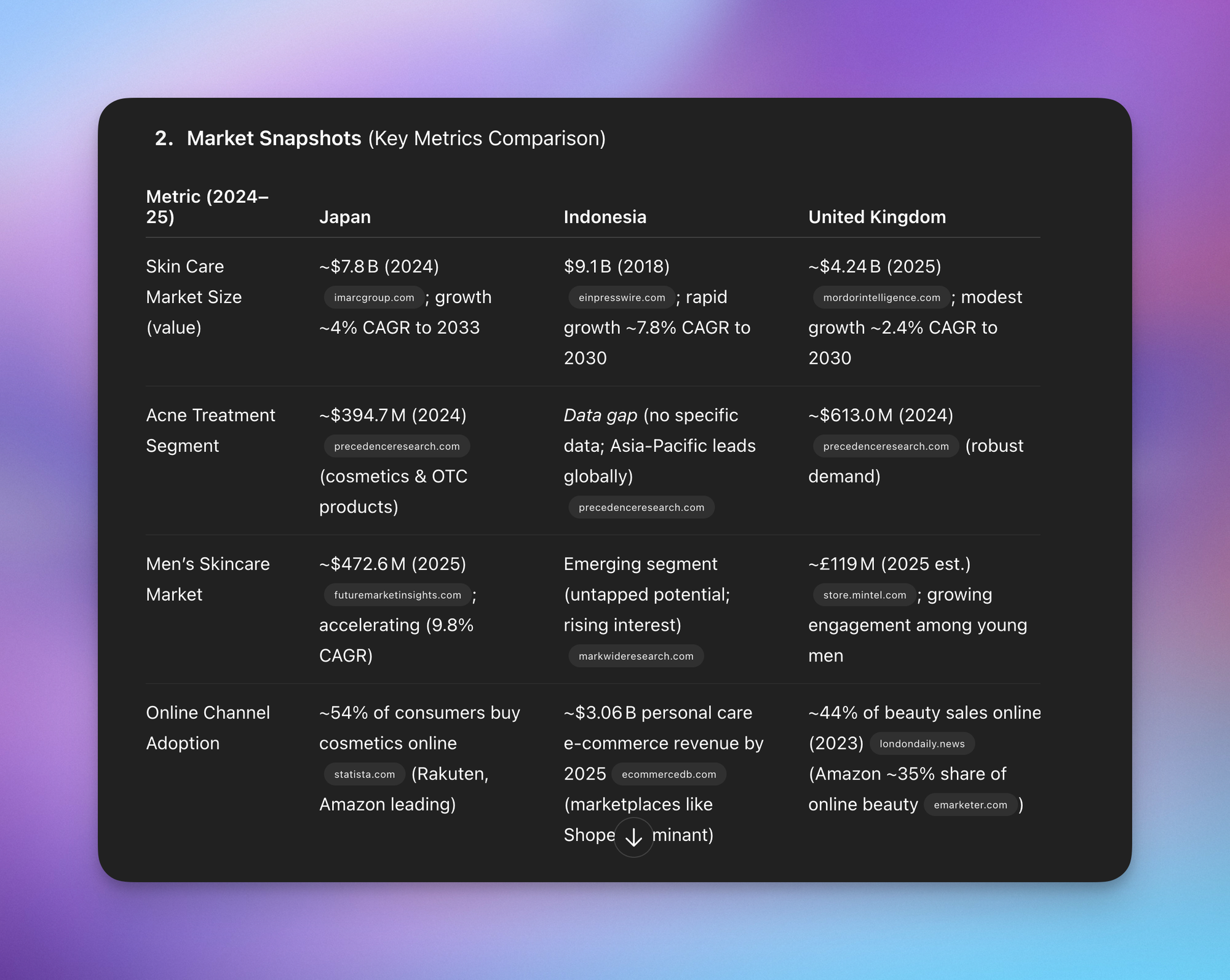
The result of this step is a detailed, text-based report with tables, analysis, and a ranked scorecard that recommends which market to prioritize.
Step 2: The Structure Phase (Using ChatGPT)
Now, you turn the dense report into a persuasive story. Tip: Create a Structured Outline
- In the same ChatGPT thread, deselect the “Run deep research” option.
- Provide a new prompt to transform the report into a presentation outline. This prompt should define the audience and the core recommendation.
Example Structuring Prompt:
“Assume the role of a senior business analyst… I’m preparing a presentation for the Chief Marketing Officer of a budget skincare company… Based on the comprehensive market research I’ve already done, your task is to prepare a presentation recommending the CMO expand into the Indonesia market. Dedicate one slide to clearly and concisely explain why the other two markets aren’t suitable.”
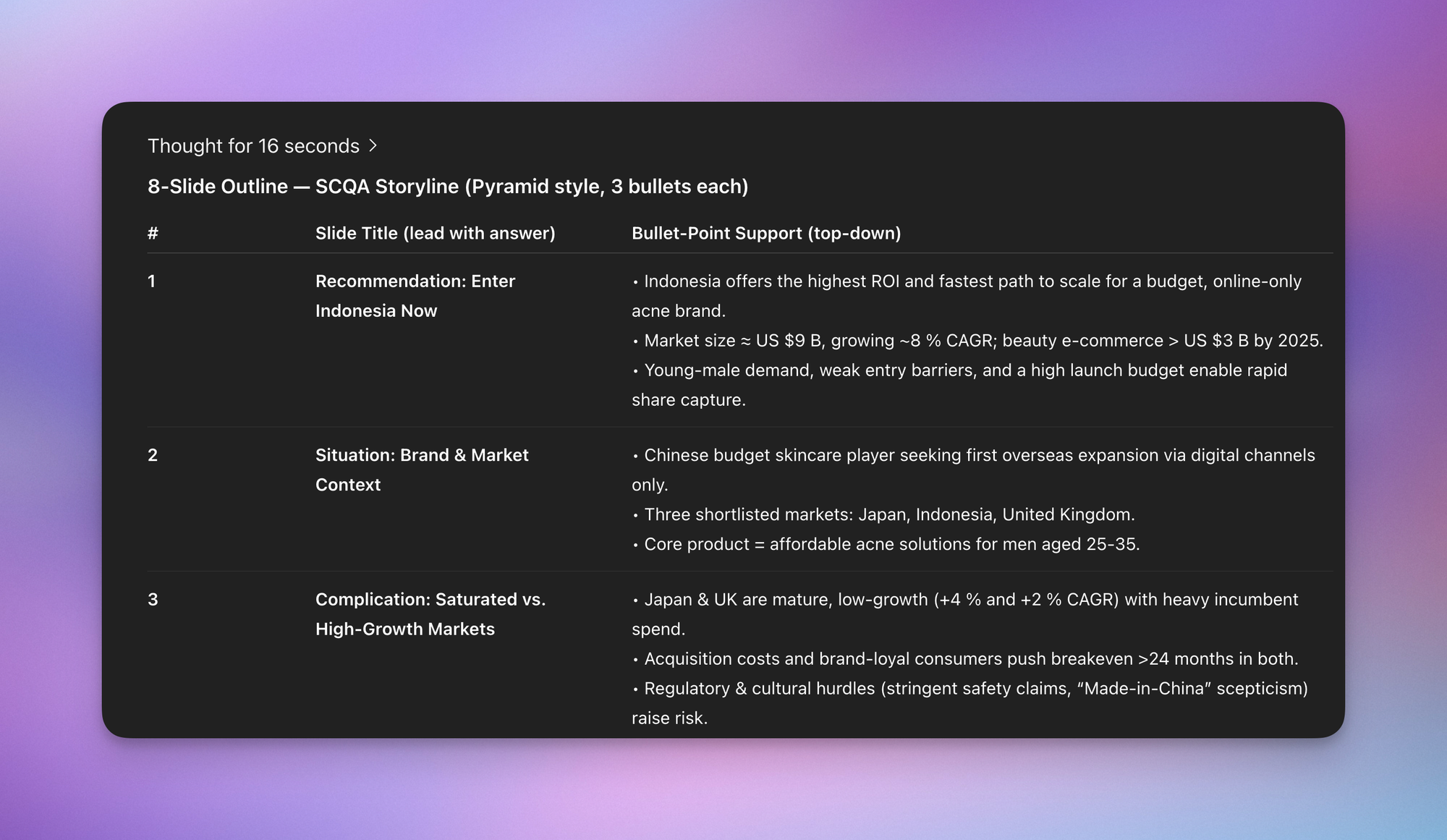
This prompt leverages the context of the previous research to create an 8-slide outline based on the SCQA (Situation, Complication, Question, Answer) storytelling framework, with a clear recommendation and supporting bullet points for each slide.
Step 3: The Design & Editing Phase (Using Gamma)
This is where you visualize the story and add the final polish.
Part A: Generating the Initial Slides
- Copy the entire 8-slide outline generated by ChatGPT in Step 2.
- In Gamma, click Create new > Paste in text.
- Paste your outline into the text box.
- In the settings on the left: Text content: Choose Condense (since you already have a strong outline). Max text per card: Choose Detailed to get more content to work with. You can always delete text later. Image source: Choose Illustrations or Stock photos for a professional look.
- Pick a professional theme (e.g., “Icebreaker”).
- Click Generate.
Part B: Editing and Refining the Presentation
This is the crucial step where human judgment and AI tools work together. Tip 1: Review for Flow and Accuracy Do a first run-through to check if the story still flows and if any critical information was lost or misinterpreted during generation. Make simple text edits where necessary (e.g., changing “market size” to the more specific “skincare market size”). Tip 2: Use “Edit with AI” for Better Titles If a slide title is weak (e.g., “Indonesia Game Plan — How We Win”), click the Edit with AI button (the star icon) on that element and give it a command like, “Use an insights-led title.” Gamma will suggest a more impactful title, such as “Capturing Indonesia’s 54% YoY Growth: Our 3-Step Market Entry Strategy.” Tip 3: Change Layouts for Visual Clarity A slide might be too busy. Select the block or row, click Change layout, and choose a simpler format like “Text boxes” or “Numbered bullets” to improve readability. Tip 4: Add Relevant Visuals and Icons
- To add icons, click the Images button on the right toolbar, select Icons, and search for a relevant term (e.g., “people,” “digital”). You can easily drag, drop, and resize these icons.
- To add photos, select an image placeholder, search Unsplash for a relevant image (e.g., “Indonesia,” “online shopping”), and select it. You can then use the Change focus point tool to perfectly crop the image within its frame.
Tip 5: Add New Slides with AI If you need to add a new slide, hover between two existing slides and click the Add card with AI button. You can then give Gamma a specific instruction with data, such as:
“Create a slide comparing the absolute size of the skincare market for the 3 markets in descending order, and assert that Indonesia is the best market to enter: [paste data from ChatGPT report here].”
Gamma will generate a new slide, often in a user-friendly table format, saving significant formatting time. Tip 6: Use the “Spotlight” Feature for Presenting When in presentation mode, you can turn on the Spotlight feature. This blurs the entire slide and reveals content block-by-block as you click, allowing you to control the audience’s focus.
How to Create Presentations with AI (the right way)
Hey friends, I get pretty annoyed when I see clickbait titles like “This AI tool completely replaces PowerPoint!”
So today, I’ll show you exactly how to combine ChatGPT’s Deep Research capabilities with Gamma’s design features to create presentations that uncover meaningful insights AND look professional.
You’ll learn a proven 3-step process that transforms raw market research into compelling business presentations, complete with tactical recommendations and data-driven storytelling frameworks used by top consulting firms.
Watch it in action
Resources
- Jeff’s Deep Research Prompt Template (see below)
- SCQA Framework Prompt Template (see below)
- Original Reddit postwith Deep Research Prompt Generator
The Real Problem with AI Presentation Tools
Here’s what most people get wrong about AI presentation tools: they’re fantastic at creating beautiful slides for what I call “low-stakes presentations,” but they completely fail at the most critical part of any business presentation - uncovering the insights that actually matter.
Think about it this way: there’s a fundamental gap between insight generation and insight presentation. These tools can’t tell you why your client should enter the US market, but they can present that insight compellingly once you have it.
The 3-Step Process That Actually Works
After years of creating pitch decks as a salesperson at Google, I’ve developed a three-step process that leverages AI tools for what they do best:
- Research Phase: Use Google Gemini’s or ChatGPT’s Deep Research feature to identify opportunities and risks
- Structure Phase: Transform findings into a structured outline that tells a clear story using consulting frameworks
- Design Phase: Drop that outline into Gamma for polished slides, then refine using your expertise
Let me walk you through exactly how this works using a real example: creating a market entry presentation for a budget skincare brand.
Step 1: The Research Phase
Open ChatGPT and select the latest reasoning model (the “o” models). The model versions change quickly, so just pick the newest reasoning model and toggle on “Deep Research.”
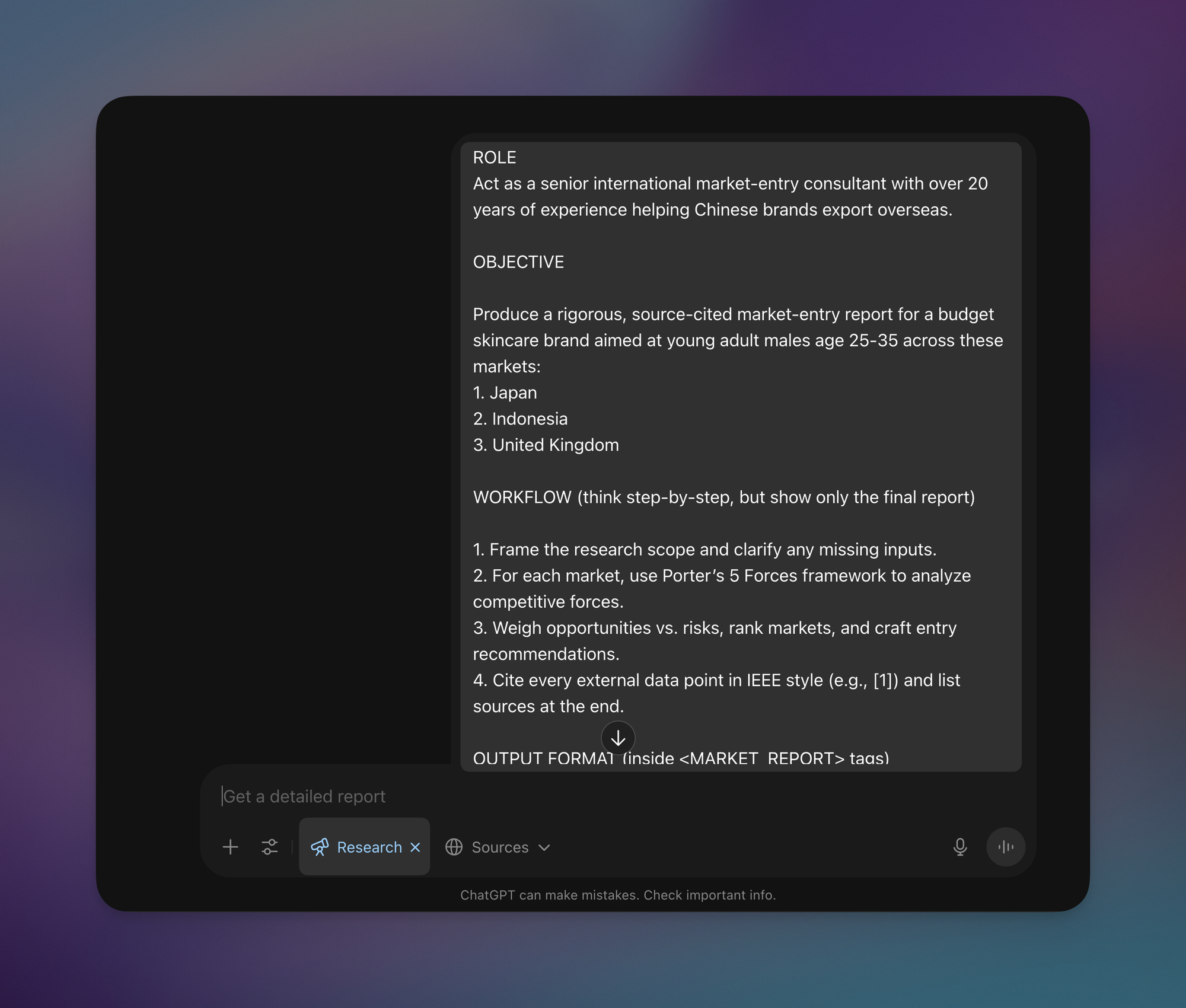
Here’s the critical part: Unlike normal prompts, Deep Research needs incredibly specific and comprehensive prompts. For our skincare brand example targeting young adult males aged 25-35, we’re analyzing three markets: Japan, Indonesia, and the UK.
My Market Entry Prompt
What Makes a Good Deep Research Prompt
Your prompt should include:
- Specific target demographics and markets
- Clear analytical frameworks (we use Porter’s 5 Forces)
- Explicit deliverable requirements (executive summary, deep dive analysis, ranked market scorecard)
- A request for ChatGPT to clarify any missing inputs
Remember, we’re not just performing market research - we’re building toward a specific recommendation for our client.
The Results That Matter
After running for about 7 minutes, ChatGPT delivers:
- A comparison table with actual market numbers
- Deep dive analysis for each country
- A ranked market scorecard (Indonesia ranks first)
- Specific, actionable insights
For Indonesia specifically, the report recommends:
- Positioning products as “formulated for tropical climates and oily skin”
- Getting Halal certification to increase trust
- Prioritizing marketplaces like Shopee and Lazada
This is the kind of specific, actionable intelligence that generic presentation tools simply can’t provide.
Step 2: The Structure Phase
Now we have a detailed report, but we need a presentation, not a research paper. This is where strategic structuring comes in.
Back in ChatGPT (with Deep Research de-selected), we use a new prompt to create a structured outline. The key elements:
- Target audience clarity (Chief Marketing Officer of a budget skincare company)
- Clear recommendation (expand into Indonesia)
- Explanation of why other markets aren’t suitable
- SCQA framework (Situation, Complication, Question, Answer) from top consulting firms
- Pyramid Principle for each slide (key takeaway first)
My SCQA Prompt Template
Why Structure Matters
Step 1 gave us the facts. Step 2 packages those facts into a compelling story that convinces the CMO to take action. The output follows proven consulting methodologies:
- First slide: “Enter Indonesia for highest ROI”
- Supporting data: $9 billion opportunity, 8% annual growth
- Contrast with slower growth: Japan (4%) and UK (2%)
- Tactical recommendations: “search volume for ‘acne wash pria’ +54% YoY”
Each slide builds on the previous one, creating a logical flow from problem to solution.
Step 3: The Design Phase
With our structured outline ready, we head to Gamma. After setting up an account (the free plan works perfectly), the process is straightforward:
- Click Create New → Paste in text
- Select Presentation format
- Configure your preferences:
- Text content: Choose “Condense” since we have a strong outline
- Max text per card: Select “Detailed” (easier to delete than add)
- AI Images: Illustrations work better than AI-generated images
- Theme: Professional options like “Icebreaker”
The 80/20 Rule of AI Presentations
Gamma generates a beautiful presentation in about a minute, but it’s only 80% complete. During your first review, check for:
- Flow continuity: Does the presentation still tell a coherent story?
- Data integrity: Did we lose any crucial information in the generation?
Common edits include:
- Clarifying terminology (“skincare market” not just “market”)
- Using AI to improve titles (“Capturing Indonesia’s 54% YoY growth: our 3-step strategy”)
- Adjusting layouts for better visual balance
- Adding relevant stock photos or icons
- Creating comparison slides with specific market data
Advanced Features Worth Using
Gamma includes several powerful features:
- Spotlight mode: Blurs everything except what you click during presentations
- Edit with AI: Quickly improves content without starting over
- Flexible layouts: Easy drag-and-drop for images and icons
- Quick commands: Use ”/” to add buttons, links, or other elements
The Human Element: Why You Still Matter
As Professor Ethan Mollick from Wharton points out, the greatest value comes not from surrendering control entirely to AI or clinging to entirely human workflows, but from finding the right points of collaboration for each specific task.
In this workflow:
- Humans definethe business problem and objectives
- AI researchescomprehensive market data
- Humans selectthe most relevant insights
- AI structuresthe narrative flow
- Humans refinethe story and messaging
- AI designsthe visual presentation
- Humans polishthe final details
Making This Work for Your Presentations
This process works for any business presentation where you need both substance and style:
- Start with Deep Researchfor any topic requiring data analysis
- Use proven frameworks(SCQA, Pyramid Principle) for structure
- Let Gamma handlethe design heavy lifting
- Always review and refinewith your expertise
Remember: **AI presentation tools like Gamma are incredible time-savers, but they’re the visualization layer, not insight generators.**Match the right tool to each phase of your process, and you’ll create presentations that both inform and impress.
If you enjoyed this
Check out my full AI playlist on YouTube!
© Jeff Su 2025